Tidy Up History Guide
Tidy Up History Walkthrough: 100% Locations and Achievements
Full route: artifact sorting loop, level 9 electricity and level 10 labeling, 16 keys, Spinosaurus skeleton, knowledge books, labels, and all 25 achievements.
Last updated: September 19, 2026
Start Here
Quick answer: Sort + repair for XP → level 9 electricity → level 10 labeling (save labels for last) → 16 keys → knowledge books + label pickups → Spinosaurus + wing Complete achievements → 100% museum.
If I am simply asking "where do I go next?", I start with the sections below on this Tidy Up History hub page.
Hi, I'm Vook, a cozy-sim player who treats this museum like a filing cabinet with dinosaur bones — pick up, highlight, place, repair, repeat until the wings stop looking like a storage unit explosion.
You inherit a wrecked History Museum. The whole game is one loop: carry artifacts to highlighted spots, fix broken pieces, clean webs and wallpaper, level up, unlock keys and new wings. No combat, no day-night economy — just restoration XP and collection grinds.
Starting wing — pick up, highlight, place, repair until the room stops looking cursed.
Leaf pages only where people stall:
- Beginners' tips — audio cues, stuck checklist, map pickups
- Cheat codes — keys, books, labels, LevelUp (last resort)
- Key locations — all 16 keys for Keymaster
- Knowledge book locations — Knowledgeable
- Label locations — physical label pickups before Archivist
- All achievements — full list of 25
Chapter order:
- Phase I — Opening loop
- Phase II — Level 9 electricity, level 10 labeling
- Phase III — Keys and wing unlocks
- Phase IV — Dinosaur exhibit (Spinosaurus)
- Phase V — Knowledge books, labels, 100% museum
What this game is
Chaotic rooms full of misplaced artifacts, broken displays, spider webs, and peeled wallpaper. Highlight tells you where things belong. Repair and clean feed XP. Keys open locked wings — the route is a chain across the building, not 16 random pins on one map.
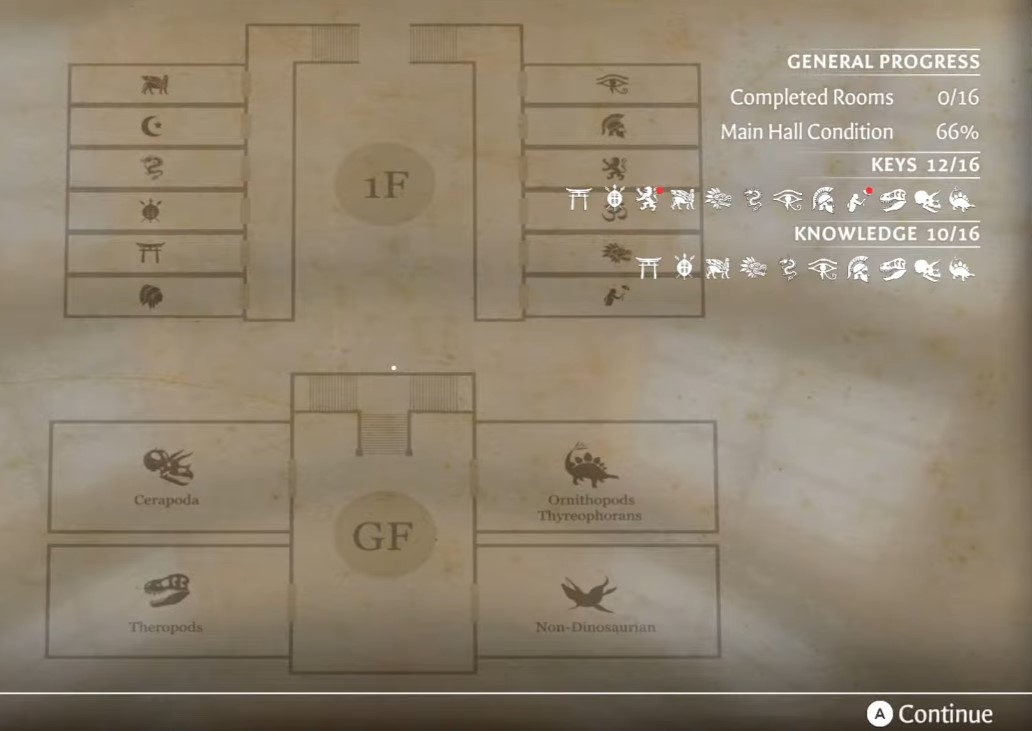
Wing map — use with the 16-key chain; the next key is often in the room you just opened, not the wing name on the door.
One rule: Full backpack → artifact room → place on highlights. Fix what you can on the trip; drop unknown items in a corner and fetch them after you unlock labeling.
Phase I — Opening loop
- Press confirm / A to start after the intro.
- Watch red dot indicators — they mark new keys you picked up recently.
- Pick up artifacts; when the backpack is full, go to the artifact room (or the wing's sorting table) and place on highlighted slots.
- Fix broken objects as you walk — repairs are your main XP source early (Handyman on first fix).
- Drop unknown items in a safe pile if you are not sure yet. Come back after Knowledge Books or labeling — do not block slots with mystery clutter.
- Use highlight constantly — it is the difference between circling a wing for ten minutes and a clean pass.
- Clean spider webs and fix wallpaper — room condition climbs, and some spots need a specific camera angle before the prompt appears (beginners' tips).
First achievements pop here: Place an Artefact, Place a Fossil (dino wing), Handyman.
Phase II — Level 9 electricity, level 10 labeling
Keep sorting and repairing — boring, but it is the whole XP engine.
| Level | Unlock | What I do with it |
|---|---|---|
| 9 | Electricity | Powers later repair/clean nodes — keep restoring rooms as you unlock wired tools |
| 10 | Labeling | Apply labels to unidentified artifacts |
Labeling rule: I save mass labeling for late game. Early labels on wrong shelves create duplicate work when highlight already solved the puzzle. Unlock Archivist (place any label) once; bulk label during the collection sweep before 100%.
Physical label pickups in the world are separate — label locations. You need those in inventory before you can label some pieces.
Phase III — Keys and wing unlocks
Keymaster needs 16 keys. They are not all in their named wing — the game hides the next key in the previous room you opened. Full chain: key locations.
While hunting keys:
- Listen for key sparkle / noise near tables, crates, and breakable floorboards.
- Read Knowledge Books — some keys sit on top of them (knowledge books).
- Use knowledge ability entries to reach locked side rooms.
Each cleared wing pushes a Complete [Wing] achievement when every artifact is placed and the room is restored — sixteen of those plus the capstones make most of the list (all achievements).
Phase IV — Dinosaur exhibit (Spinosaurus)
The Dinosaur Exhibit is both a wing and an achievement gate.
- Collect Spinosaurus bones scattered in museum rooms and the exhibit hall.
- Carry each bone to the highlighted slot on the mount — same rules as artifacts.
- Finish the full skeleton → When Dinos Ruled the Earth (assemble any complete dinosaur; Spinosaurus is the main set piece).
Bones behave like oversized artifacts — full inventory trips, highlight on, no guessing. I finish Theropod / Cerapoda room sorting first so the exhibit floor stays walkable.
Phase V — Knowledge books, labels, 100% museum
Late-game checklist — do in parallel, not strict order:
| Goal | Link |
|---|---|
| All Knowledge Books | knowledge book locations → Knowledgeable |
| All label pickups | label locations |
| 16 keys | key locations |
| 16 wing Complete + capstones | all achievements |
100% route I use:
- Keys first — opens every wing.
- Knowledge books on the same laps — many sit in wings you already unlocked.
- Sort + repair each wing to Complete status.
- Spinosaurus bones when Theropod / fossil rooms are clean.
- Grab label pickups → apply labels → Archivist and wing polish.
- Final cobweb / wallpaper pass for Master Cleaner and Fully restore the Museum.
Mistakes I made
- Hoarding unknown items in the backpack — blocks runs; drop and tag later.
- Labeling at level 10 immediately — rework when highlight disagrees.
- Ignoring camera angle on webs — prompt never shows, I thought the room was bugged.
- Hunting keys before reading the chain — the Egypt key in Theropod room wasted twenty minutes until I checked the list.
Once the museum hits fully restored, you are done — no NG+ pressure. Optional deep clean: beginners' tips for QoL I wish I knew on hour one.
Finished Tidy Up History? Find your next game.
Browse the full library or pick another hub from the homepage.
Browse all game guides →